

Edu temp mail is a disposable inbox on an academic-style domain. You open a generator, pick an address that ends in .edu.pl, and read the mail that arrives. No school issues it, it proves nothing about enrollment, and it vanishes when the temporary window ends. Use it for a one time code.
The .edu part is a domain suffix, nothing more
An address that ends in .edu looks official. The suffix carries weight because, in the United States, only accredited postsecondary institutions can hold a .edu domain. EDUCAUSE administers that namespace under an agreement with the US Department of Commerce, and eligibility turns on institutional accreditation, not on teaching or serving students.
A bootcamp, a training company, and a person cannot qualify. That rule is the whole reason a .edu address works as proof of enrollment in the first place.
.edu.pl is a different namespace. It is the Polish academic namespace, and NASK, the Polish national research and academic network, administers it. Domains on it can look academic without belonging to any university.
VanishInbox, one of the services ranking for this term, puts it plainly on its own page: its reason.edu.pl, realize.edu.pl and remind.edu.pl addresses sit on that namespace and carry no link to any specific university or enrollment. Tempmail.pw’s edu temp mail works the same way. Its EDU generator creates addresses on education-style domains that end in .edu.pl. No university issues them.
No school has approved them.
That distinction decides everything else in this article. The domain suffix tells you where the address lives. It tells you nothing about the person holding it.
What an edu temp mail actually gives you
It gives you a working inbox for a short time. You generate an address, paste it into a form, and read the reply in the same browser tab. You never hand over your real address, so the marketing mail that follows a signup lands in an inbox you can abandon.
That is the entire product. It does not give you a student identity, a mailbox you own, or a way back in after the window closes.
The inbox receives mail only. You cannot send from it, and you cannot use it to reset a password later, because the address will not exist when you need it. Tempmail.pw says the same on its EDU page: the address works like its other temporary addresses, it receives mail on the home page, and it is not permanent. Save any code or link you need before you move on.
An edu temp mail address also differs from a plain temp mail address in one small way. The domain looks academic, so forms that expect an education-style address accept it more often. The moment a form checks enrollment instead of checking the shape of the address, the advantage ends.
How to get edu temp mail on tempmail.pw
Open the edu email generator (https://tempmail.pw/en/edu-mail-generator). The page lays out four moves, and the whole thing takes less than a minute.
- Type the name you want. Letters and numbers only. Tap Random Name if you would rather let the generator pick one.
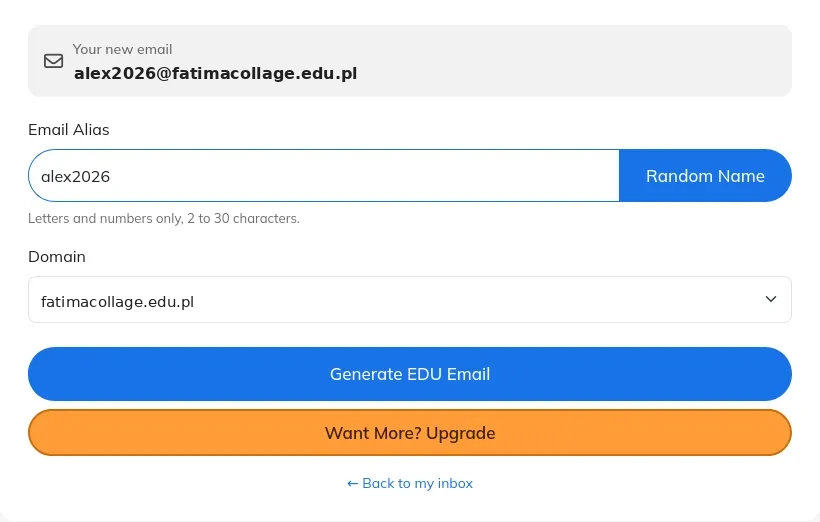
- Pick a domain from the EDU domains on the page.
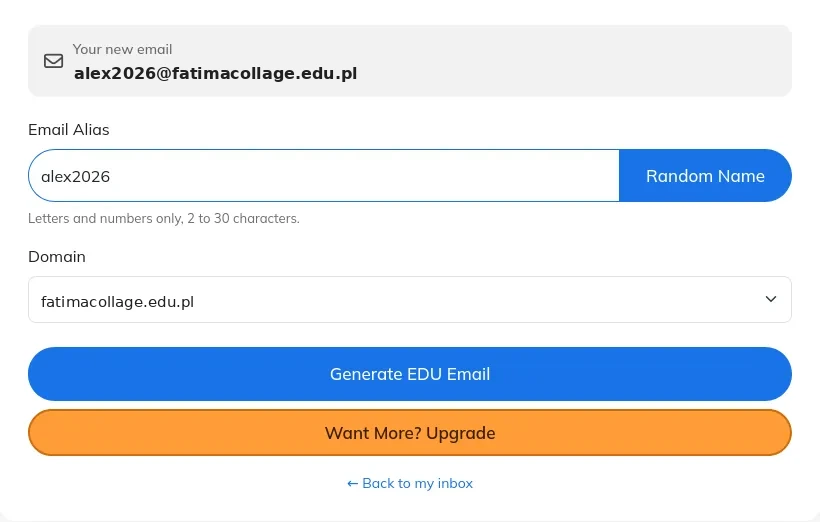
- Click Generate EDU Email. The new address becomes your active inbox.

- Copy the address, paste it where a site asks for an email, and watch for new messages on the home page.
Free domains are open to everyone. Paid plans add premium domains and extras such as using your own domain. If you want the same tool without the EDU domain, the home page (https://tempmail.pw/en/) offers plain temporary addresses, and the shorter timers suit jobs with a narrow window. The existing guide on this blog explains the main service in five steps (https://tempmail.pw/blog/what-is-temp-mail-ninja/).
Three questions to ask before you paste the address
Ask three questions about the signup in front of you, in this order.
Will I need this account in a month?
If the answer is yes, stop. Password resets, order history, and support tickets all assume the inbox still exists. A temp address cannot do that job. Use your real address, or an alias you control, for anything you expect to return to.
Does this form check enrollment, or does it only ask for an email?
A newsletter form asks for an email. A student discount form checks enrollment through a university portal or a real .edu inbox. Tempmail.pw says the same on its EDU page: stores that check enrollment through a portal will still ask for a real student login.
Paste a temp address into the first kind of form. Do not paste it into the second and hope the check misses it. If you are an enrolled student, your real institutional address is the one that passes. If you are not enrolled, no address makes you enrolled.
What happens if this service blocks disposable domains?
Some services keep lists of disposable domains and reject them at signup. Others accept the address and then block it later, when you try to reset a password. Neither outcome is a bug you can fix from your side.
Try the address once. If the form rejects it, use a different inbox you own. Do not cycle through fresh temp addresses to wear the check down. That turns a privacy tool into an evasion tool, and it can get the new account restricted.
These three questions also explain why the guides in this niche agree on the discount point. VanishInbox warns that using a disposable address to misrepresent enrollment can breach a platform’s terms and put the account at risk. TempEduMail warns that entering a temp address where a school affiliation is requested will not give you student status. They are describing how the check works.
Where it fits, and where it fails
Edu temp mail fits the small jobs. A course signup, a webinar registration, a gated download, a newsletter aimed at students. It fits testing, too.
A developer testing an education-gated signup flow can watch the verification mail land, confirm the form accepts the academic-style domain, and move on without ever exposing a real inbox to a service still being evaluated. It fits a one-time trial of an AI tool, where you want to see the product before you decide it deserves your real address.
Edu temp mail fails wherever enrollment is the point. Student discounts, the GitHub Student Developer Pack, Spotify Student, Amazon Prime Student, Notion Plus, and every other enrollment-gated benefit check whether you are enrolled. They do not check whether your address ends in something academic. A temp address cannot pass that check, and using one to suggest otherwise can breach the program’s terms and get the account restricted.
It also fails wherever the mail itself matters. Banking, medical mail, identity documents, password recovery, and any account you expect to keep all need an inbox that will still exist next month. A temp inbox expires and takes access with it.
What matters is what the other side verifies. If it verifies an email string, a temp address works. If it verifies a person, it does not.
Temp edu, real edu, and regular temp mail side by side
| Point | Temp edu email | Real university email | Regular temp mail |
|---|---|---|---|
| Who issues it | A generator, instantly | A university, after enrollment | A generator, instantly |
| Proves enrollment | No | Yes | No |
| Signup needed | No | Yes, with enrollment | No |
| How long it lasts | Temporary, then gone | While you are enrolled | Temporary, then gone |
| Can it send mail | No, receive-only | Yes | No, receive-only |
| Best use | One-time codes and low-stakes education signups | Student life, benefits you qualify for, recovery | Any quick signup where the domain shape does not matter |
Why some sites reject it
Some services block edu temp mail domains outright. They keep lists of domains that belong to temp mail services and refuse them at the form. Others let the address through and quietly drop the verification mail. You cannot tell which one you are dealing with from the outside.
A blocklist names the domain rather than the person behind it, so generating a fresh address on that same domain meets the same wall, and the only move left is an inbox the service already accepts.
The practical move is simple. Paste the address, wait a minute, and check the inbox. If nothing arrives, try once more with a different domain.
If it still fails, the service has made its choice. Use an address you own.
Frequently asked questions
What is edu temp mail?
Edu temp mail is a disposable inbox on an academic-style domain, usually ending in .edu.pl. You generate it in seconds with no signup, paste it into a form, and read the reply in the same tab. It is a privacy and testing tool, and it proves nothing about enrollment.
Is edu temp mail a real student email?
A real student email comes from a school after enrollment, lives on an official .edu domain in the United States, and stays active while you study. An edu temp mail address comes from a generator, sits on an education-style domain such as .edu.pl, and disappears when its temporary window ends.
Can I use edu temp mail for student discounts?
Discounts that check enrollment are out of reach. Those programs verify student status through a university portal or a real .edu inbox, and a temporary address cannot replace that check. Using one to suggest enrollment you do not have can breach the program’s terms and put the account at risk.
How long does an edu temp mail last?
It depends on the tool. Tempmail.pw does not publish a fixed lifetime on its EDU page. The address works like its other temporary addresses and is not permanent, so save any code or link before you move on. Other services state a number: VanishInbox deletes its addresses after 10 minutes, while TempEduMail deletes them after at most five days.
Can I use it for the GitHub Student Developer Pack or Spotify Student?
Both programs check enrollment, not the shape of an address. A temp edu address will not pass that check. If you are an enrolled student, use the real institutional address your school gave you. If you are not enrolled, no temporary address changes that.
Try it on a signup you can afford to lose
Open the edu temp mail generator, make one address, and use it for a single low-stakes signup, a course page or a webinar form. Watch the code arrive, use it, and let the inbox go. Keep your real address for the accounts that need to last. That split, one inbox for trying things and one inbox for keeping things, is the whole point of the tool.
Subscribe to our email newsletter to get the latest posts delivered right to your email.
Comments