

A disposable email generator creates a temporary inbox address that really receives mail. Open the page, copy the address, paste it into a form, and read the code or link when it lands. It keeps your real inbox off marketing lists. It is not a permanent address, and it cannot help with accounts you need to recover later.
Two tools share one name
Search for a disposable email generator and the results split into two different products. One kind prints an address that cannot receive anything. It is a string on a screen, useful for filling in a form that never sends mail, and useless the moment a code or a link has to arrive.
The other kind hands you a working inbox in the browser. Mail lands in it, you read it, and the address disappears when you are done.
The distinction matters because the name hides it. Both call themselves generators. Only the second one solves the problem most people actually have, which is a sign-up form that sends a confirmation message.
If the site sends nothing, either kind works. If it sends a code, only a working inbox will do.
A disposable email generator in the useful sense is a small web tool. It creates a temporary address on a real mail domain, shows the inbox on the same page, and deletes everything when the session ends. There is no account to create and nothing to install. The address is ready the moment the page loads, and a disposable email generator like that answers one question only: where can this message go without touching my real inbox?
One more distinction is worth making early. A disposable inbox receives mail.
It does not send mail, and it cannot pretend to be someone else. The address belongs to the generator’s domain, and every message in it is addressed to you. That is the whole job.
How to use a disposable email generator on tempmail.pw
The home page on tempmail.pw is a disposable email generator that issues a temporary address the moment it loads. There is no form to fill in and no account to create. The guide on this blog, What Is Temp Mail Ninja, explains the service step by step.
- Open the home page. Your temporary address is ready at once, in your live mailbox on the same page.
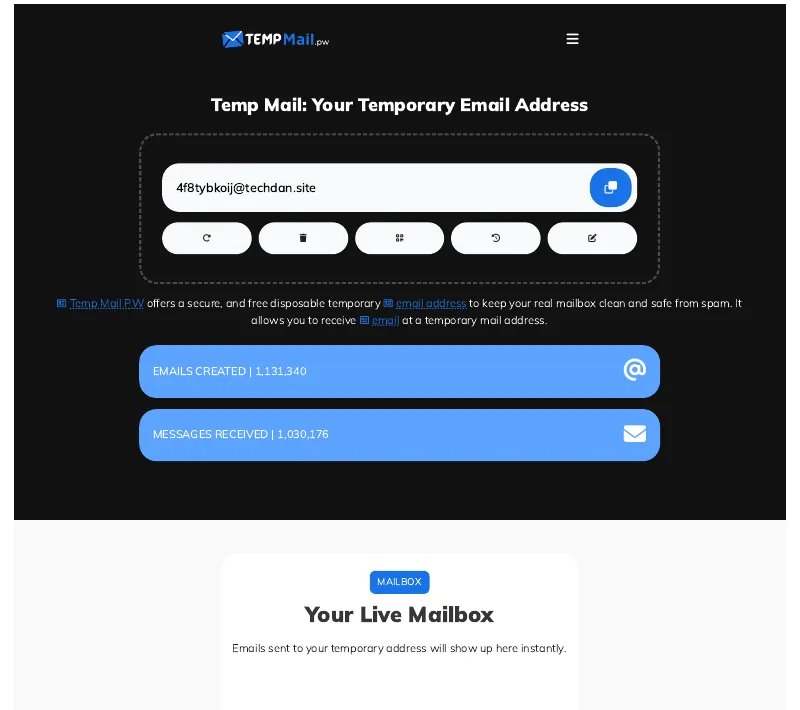
- Copy the address. Use the copy button so you do not mistype it.
- Paste it into the form that asked for an email, then submit the form.
- Watch the inbox on the same page. The message usually appears within seconds.
- Open the message, copy the code or click the link, and finish the signup.
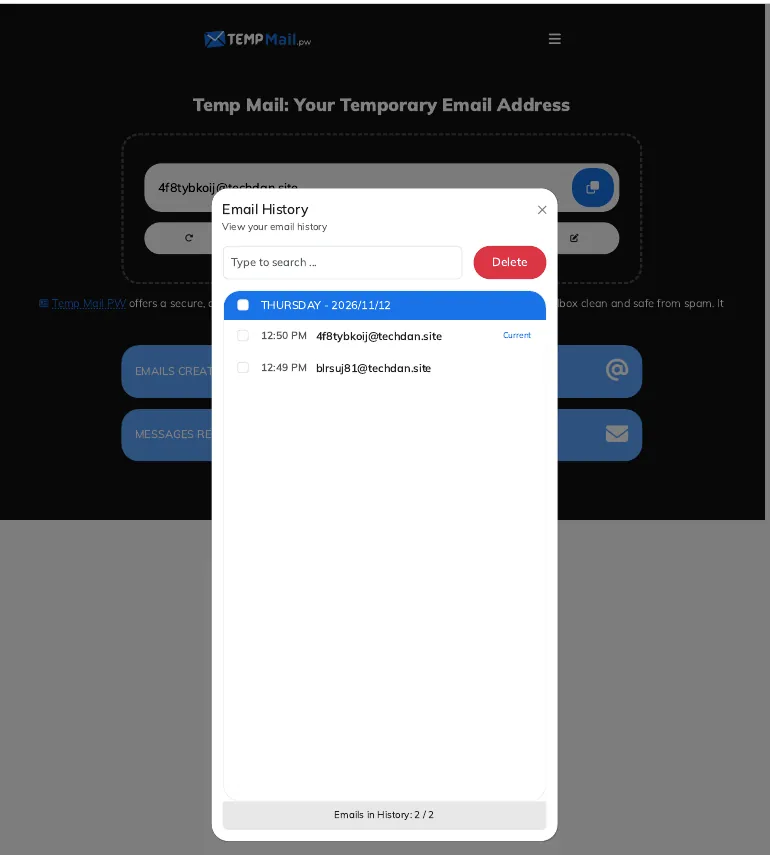
If you close the page and come back, Email History lets you reopen a previous temp mail address. That helps when a code arrives late or you need to check a second message from the same signup. The address still expires on its own schedule, and History cannot bring back an address that is already gone.
When a signup has a short deadline, the timer pages fit better. The 10 minute mail page gives you an address with a countdown, and the 10 minute mail guide on this blog covers the timer choice window by window. The OTP guide walks through that flow in full. And if the signup needs an academic-style address instead, the edu mail guide on this blog covers that case.
What it is good for
A disposable address earns its keep anywhere the exchange is one-sided and short. A free trial is the classic case. You test a service properly without handing your real address to its marketing list.
The trial works, the follow-up promotions land in an inbox you were never going to keep, and your main inbox stays quiet. A disposable email generator is built for exactly that trade.
Newsletter previews work the same way. Read two or three issues from a disposable address first. If the newsletter is worth keeping, subscribe properly with your real address. If it is not, close the tab and the subscription ends with it.
One-time signups are the everyday case. A download that wants an email before it hands over a PDF, a forum that needs an address to let you post, a gated article, a webinar registration. Each one is a single task. A disposable email generator gives you an address for that task and nothing more.
Developers use disposable inboxes for a different reason. Testing a signup flow means checking that the confirmation email arrives, the link works, and the code is readable. A disposable inbox lets a tester run that check without filling a work inbox with test accounts.
LingoJam puts it plainly: developers rely on disposable inboxes to test registration flows, confirmation emails, and password-free sign-up steps. A disposable email generator keeps test mail out of the work inbox entirely. The address is a tool for a single test, not a home for an account.
Disposable email generator, alias, or real email
Three kinds of address can receive a message, and they differ in what happens after it arrives. That difference decides the choice, so it is worth seeing side by side.
| Address | What happens to the mail | Can you return to it later? | Best for |
|---|---|---|---|
| Disposable email generator | Arrives in a temporary inbox, then deletes with the address | No, expiry is final | One code, one signup, one download |
| Email alias | Forwards to your real inbox, where messages stay | Yes, as long as the alias exists | Codes you may need again, with your real inbox shielded |
| Real email | Arrives in the inbox you own | Yes | Accounts you keep, with recovery |
An alias is the middle option. Messages sent to an alias land in your primary mailbox, where you can keep them as long as you like, and deleting an alias does not delete the messages already there. A disposable address works the other way. It receives the mail and then deletes itself with the address, and nothing can bring it back.
That difference decides the choice. If the signup sends one code and you will never need that account again, a disposable email generator is the lightest tool for the job. If the service might send a second code later or a password reset, an alias keeps the route open without exposing your real address. If the account matters enough to recover, use the real address.
How to spot a spoofed or phishing email
A disposable inbox keeps a bad message out of your main inbox. It does nothing about the message itself. Spotting one still comes down to reading it properly, and the signs are consistent enough to check in seconds.
Start with the sender. CISA warns that a phishing address often imitates a legitimate business by altering or omitting a few characters. A familiar name with one letter changed, or a domain that is almost right, is the most common tell. Open the full sender address instead of trusting the display name.
Then look at the greeting. A generic greeting such as “Dear Valued Customer”, plus a signature with no contact information, is a strong indicator. A trusted organization normally addresses you by name and gives you a way to reach it.
Links deserve a hover before a click. If the link text and the address that appears on hover do not match, the link may be spoofed. Attackers use spelling variations, a different domain ending such as .net instead of .com, and URL shorteners to hide the real destination. A real message from a service you use will take you to its own domain.
Spelling and layout give away the rest. Poor grammar, misspellings, and inconsistent formatting point to a message that no real company proofread. An unsolicited attachment is another warning, especially when the message pushes urgency to get you to open it without thinking.
CISA gives the rule that covers all of it. Be suspicious of unsolicited messages asking for personal information. Do not follow links sent in email.
Verify the sender through a contact method you already trust, not through anything in the message itself. If you are unsure whether a request is legitimate, contact the company directly using details from a previous statement, not from the message. And enforce multifactor authentication on the accounts that matter.
A disposable address helps here in one quiet way. If a spoofed message lands in a temporary inbox, it never reaches the account you care about, and it disappears with the address. That keeps the damage away from the account you care about. Reading the message still has to happen.
A disposable email generator will not warn you about a spoofed link. The inbox shows the message as it arrived, and the check is yours to make.
When the code never arrives
When a disposable address fails, the cause usually falls into one of three groups, and each needs a different response. A disposable email generator cannot fix any of them on its own. It can only show you which one you are dealing with.
The site refuses disposable addresses. Some services check signups against lists of disposable domains. They may reject the address at the form with an error, or accept the form and never send the code.
LingoJam states the position plainly: a block is a known limitation, not a fault with your address. Generate a fresh address, because another domain may be accepted, and try again.
If a service still refuses any disposable domain, decide whether it is important enough for your real address. For a long-term account, it probably should have had it in the first place.
The sender is slow. Verification mail is often batched, and some senders run their own checks before releasing it.
Wait a full minute, then use the site’s resend option once. Pressing resend again and again can delay the next message or trigger a block. If the code still has not arrived after a couple of minutes on a live inbox, the block is the likelier cause.
The code went somewhere else. It may have gone to the email already on file for an existing account, or to another channel entirely, such as SMS. It may also have gone to an address you mistyped by one character. Check the confirmation screen and compare the address shown there with the inbox you are watching, character for character.
A disposable email generator cannot tell you where a missing code went. Only the confirmation screen can.
A disposable address runs on a clock. When the time ends, the inbox and its messages go with it.
Where a disposable address stops being a good idea
The line is simple to state and easy to ignore in the moment. If losing the address could cause trouble later, a disposable email generator is the wrong tool. Use an address you will keep control of for the long term.
Banking, payment services, government portals, and work accounts all sit on the wrong side of that line. So do healthcare and crypto wallets. The same goes for any social or shopping account you plan to keep.
The pattern is the same in every case. You sign up with a temporary inbox. Months later you forget your password, and the site sends a recovery link to an address that no longer exists. There is no way to receive that message, and no support ticket can bring the inbox back.
Two-factor authentication on an account you value belongs on an authenticator app. A disposable inbox cannot hold that job. An expired inbox means a locked account, and the code that would have unlocked it is gone with the address.
| Use a disposable address for | Do not use it for |
|---|---|
| One-time signups and downloads | Banking and payment accounts |
| A free trial you are testing once | Password recovery for accounts you keep |
| A newsletter preview before subscribing properly | Work, government, healthcare or crypto accounts |
| Testing a signup flow as a developer | Any account you may need to recover later |
Frequently asked questions
Is a disposable email generator free?
The generators worth using cost nothing and ask for no account, no card, and no personal details. You open the page, copy the address, and use it. Some services sell a premium tier with private addresses or forwarding, but the basic job of receiving one code or link is free everywhere it matters.
Can a disposable email address receive verification codes?
Yes, when the code arrives by email. Generate an address, paste it into the signup form, and the code usually appears in the inbox within seconds. It has to land while the inbox is open, and the site must accept disposable addresses. Codes sent by text need a phone number, and no email inbox can receive those.
Why did a site reject my disposable address?
Some services keep a list of disposable domains and refuse them, usually because they want a lasting contact address or are trying to stop abuse of free trials. The rejection does not mean your inbox is broken. Generate a fresh address on a different domain and try again. If every disposable domain is refused, register with your real email instead.
How long does a disposable email address last?
It depends on the service. 10 Minute Mail gives you ten minutes, Guerrilla Mail about an hour, and YOPmail keeps messages for eight days. On tempmail.pw, the home page address has no countdown, and the timer pages run 5, 10, 20, 30, or 60 minutes. Treat every disposable address as short-lived.
Can I use a disposable address for my bank?
A bank account needs recovery and later verification, and both go to the address you signed up with. Once a disposable inbox expires, that route is gone for good, and the bank may reject disposable addresses under its own policies anyway. Use a permanent address and an authenticator app for anything tied to money.
Get an address and use it once
Open the home page and take one address. Use it for a single low-stakes signup or a download that wants your email first. Watch the code land and use it, then let the address go. That is a disposable email generator done right: one address, used once, then gone.
Keep your real address for the accounts that need to last, and keep the disposable one for the codes that do not. The inbox you throw away should never hold anything you would miss.
Sources
- Temp Mail PW, home page, https://tempmail.pw/en/ (flow described from the site’s own step screenshots, home-step-1/2, captured 12 Nov 2026; live page fetch timed out on 16 Nov 2026; home page issues a plain temporary address at once, Email History reopens previous addresses)
- Temp Mail PW, 10 Minute Mail, https://tempmail.pw/en/10minutemail (opened 15 Nov 2026; 10 minute expiry, refresh icon restarts timer, fresh address on expiry, receive-only, 5/10/20/30/60 windows)
- LingoJam, Temporary Email Generator, https://lingojam.org/temp-mail (opened 16 Nov 2026; one-click disposable address on a real mail domain, receive-only, auto-refresh every 10 seconds, attachments, developer testing, never for banking or password resets, sites block disposable domains)
- Waalaxy, Disposable email: 11 tools for temporary email! 2026, https://www.waalaxy.com/blog/email-contact-data/disposable-email (opened 16 Nov 2026; YOPmail messages kept 8 days, Guerrilla Mail about 60 minutes, 10 Minute Mail, Maildrop anti-spam filters, Mailinator API)
- CISA, Avoiding Social Engineering and Phishing Attacks, https://www.cisa.gov/news-events/news/avoiding-social-engineering-and-phishing-attacks (opened 16 Nov 2026; phishing indicators, verify the sender through a contact method you already trust, do not follow links sent in email, enforce MFA)
Subscribe to our email newsletter to get the latest posts delivered right to your email.
Comments